
Over the past few months, I’ve been using Airflow’s Asset (previously Dataset) feature quite a bit. Along the way, I ran into some unexpected scheduling behavior and I did not find a lot of documentation that allowed me to understand these problems.
In this post, I’ll walk through the issues I encountered, show how Asset scheduling works under the hood and why certain problems like out-of-sync triggers can occur. By the end, you’ll have a deeper understanding of how Airflow processes Asset events and how to avoid scheduling pitfalls in your own pipelines.
Introduction: The Promise of Airflow Assets
Airflow 2.4 introduced the concept of “data-aware scheduling” in which a DAG can be scheduled based upon a task (or an external system) updating a Dataset. This is a step towards more event-driven scheduling: the DAG starts when the data it needs is updated, removing the need for polling or complex dependencies between DAGs.
In Airflow 3, Dataset is renamed to Asset (along with some improvements), so I will stick to using Asset. From the Airflow docs:
An Airflow asset is a logical grouping of data. Upstream producer tasks can update assets, and asset updates contribute to scheduling downstream consumer dags.
An asset is defined by a URI, which is treated as a string: this URI is purely a logical representation of data. A task can update an asset (= an asset event) or an external system can create an asset event through the Airflow REST api. When a DAG is scheduled on an asset X and there was an asset event, a DAG run is triggered. I will not go into further detail here, but let’s introduce this scenario:
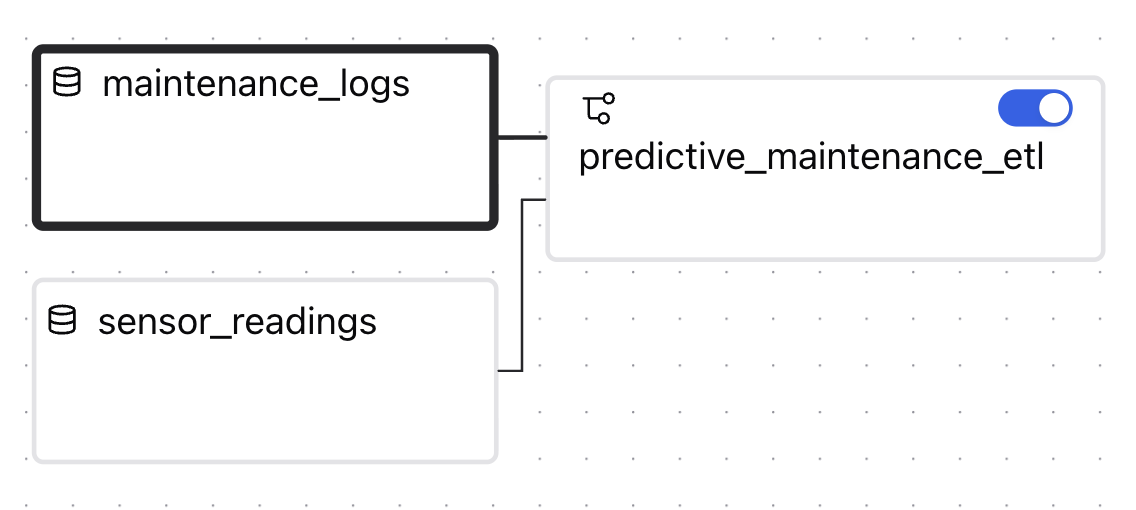
The predictive_maintenance_etl DAG performs ETL operations on maintenance logs and sensor readings, preparing data for a predictive maintenance model to be trained. This DAG is scheduled on two assets, so when an asset event for the maintenance_logs asset and one for the sensor_readings asset is recorded, the DAG will start. I’ll use this scenario to show which problems I encountered.
Problem #1: Out-of-Sync Triggers
Let’s say that the DAGs that update the maintenance_logs and sensor_readings assets run daily. So under normal circumstances, the predictive_maintenace_etl DAG runs once a day.
In the figure, 23/10 represents a normal day where everything works as expected: first there is an event for maintenance_logs, then one for sensor_readings which triggers the DAG.
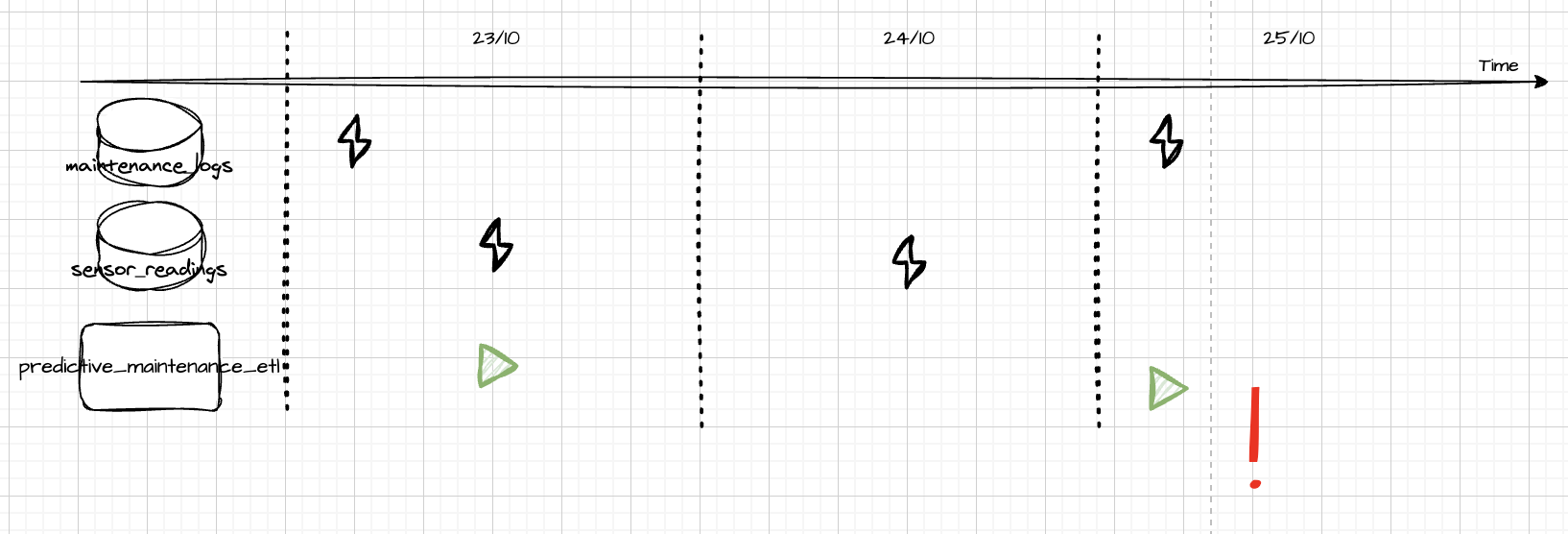
The next day (24/10), there was a problem somewhere in the process of creating the maintenance_logs data, and hence there was no event for this asset. Since there was no event, the DAG is not started.
On 25/10, the maintenance_logs event arrives again and the DAG immediately starts, since an event is recorded for both assets. This is a problem because on 25/10 the data represented by the sensor_readings asset is not updated yet.
This limitation boils down to
There is no time window concept in asset schedules
and this can lead to out-of-sync triggers.
It’s important to note that this is not really a limitation of the Asset mechanism itself, but it is more a mental model mismatch: when we design pipelines, we often think in time-based terms: “every day, run this DAG after the data for that day arrives.” But the Asset scheduling mechanism doesn’t care about dates or time windows, it only reacts to events.
3. Under the Hood: How Asset Events Work
To better understand why this problem occurs, let’s dive into the Airflow metadata db and the mechanism of the assets.
When an asset event is generated for sensor_readings, a record is inserted in the asset_dag_run_queue table:
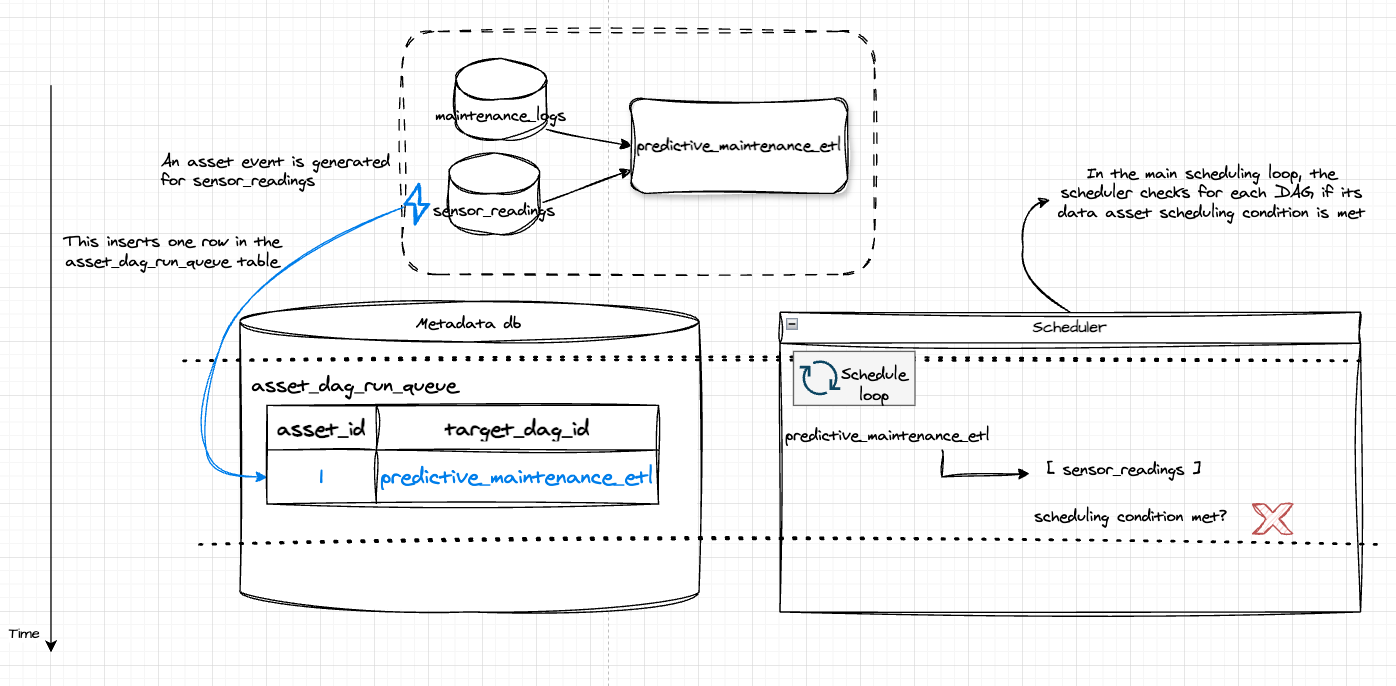
The main scheduler job loop reads all records from the asset_dag_run_queue and groups them by target_dag_id. For each DAG, it checks if the scheduling condition is met. This is not the case since there is only one asset event.
Now another asset event is recorded:
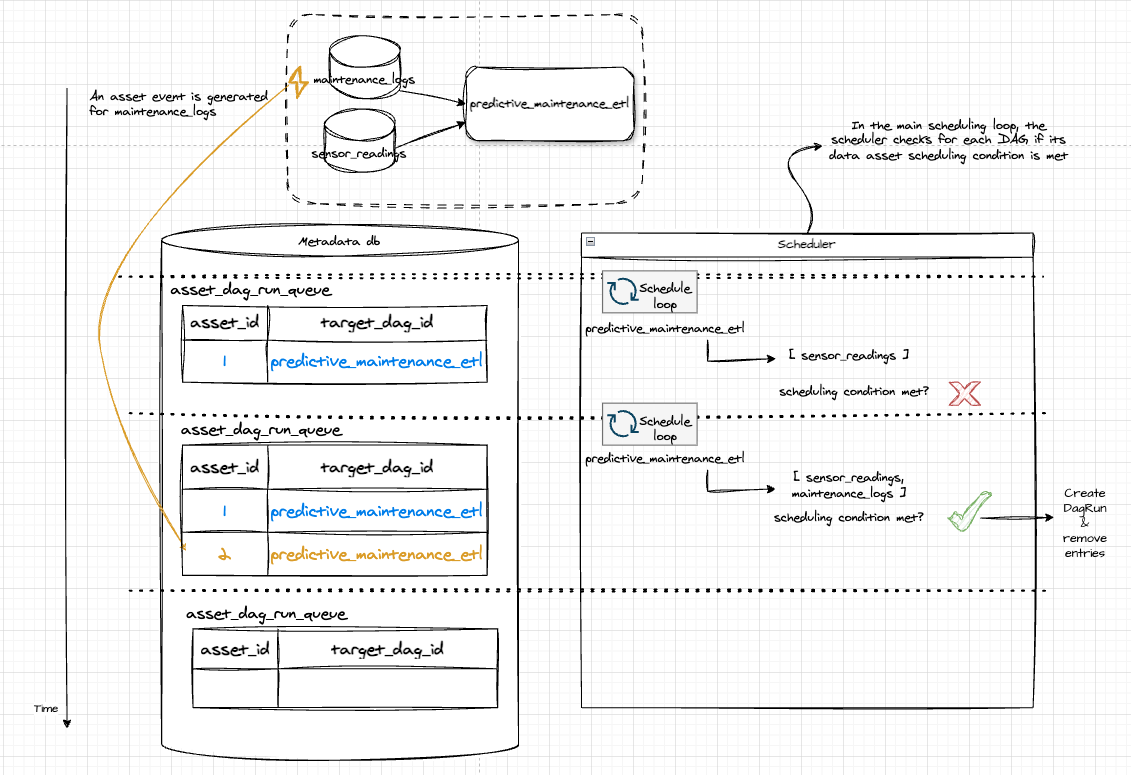
This time the scheduling condition is met: there is an asset event for both sensor_readings and maintenance_logs. The scheduler will create a DagRun and will remove the entries from the table.
This helps to better understand the fact that data asset scheduling does not have a concept of a time window: in the previous scenario, on 24/10, the asset_dag_run_queue table is filled with one entry for the sensor_readings asset. The next day, a record is added for the maintenance_logs asset. The scheduler sees the scheduling condition met and the DAG starts.
4. Solution: Resetting the Window/ manually applying a time window
If a time window is needed (like in our daily ETL scenario), there is a solution. Rows in the asset_dag_run_queue table that haven’t yet triggered a DAG ( = pending queued asset events) need to be removed. Directly emoving entries from the metadata database is generally speaking a bad idea, luckily Airflow provides an endpoint for this:
DELETE /api/v2/dags/{dag_id}/assets/queuedEvents
The DELETE operation will remove all pending asset events for a given DAG. So in our scenario, this operation should be executed at the end of each day. This daily reset can be executed by another DAG, but this creates additional overhead.
5. Problem #2: Complex Dataset Expressions
Airflow supports logical expressions for the dataset schedule, for example:
(A & B ) OR (B & C)
Before delving into the issue, let’s consider a practical use case for such a schedule. Imagine we have a couple of DAGs that prepare different datasets used for training ML models. The training is done by an external system, and this system needs to be triggered by an API call. There are three assets representing the data used for training: A, B and C. There are two models being trained:
- model X depends on data assets A and B
- model Y depends on data assets B and C
To translate the asset events to outgoing API calls, we can create 1 DAG:
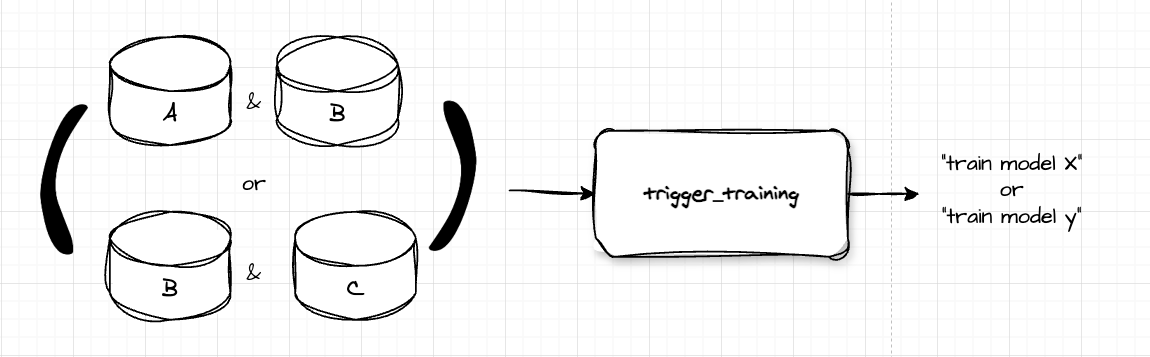
This DAG has schedule (A & B ) | (B & C). If the DAG starts, it can check which assets triggered it, and translate this to trigger the training of the correct model: if A and B is recorded, this should be translated to “model X is ready to train”. This is a clean solution with only 1 DAG which makes it easy to monitor.
This solution will not work though. Consider incoming events:
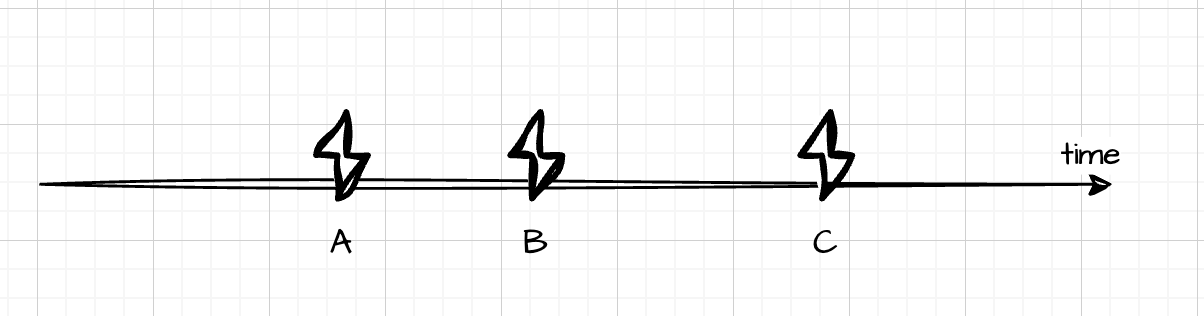
Since datasets A, B and C are updated, both models X and Y can start training. So the DAG should be triggered twice, resulting in 2 outgoing triggers for model X and model Y. However, after the second event the rows in the asset_dag_run_queue table are removed and when C arrives, there is no scheduling condition met.
Thus, this means that we need a different trigger DAG for each model, leading to more DAGs.
6. Conclusion
Data assets offer a powerful mechanism towards more event-driven scheduling in Airflow. However, there are some limitations:
- out-of-sync triggers can occur when your asset schedule has a time window. This can be solved by introducing an additional “reset queued event” DAG
- When using complex data asset logic, overlapping assets in the logical expression may lead to unexpected results
Understanding the mechanism of how data asset events are tracked helps in identifying problems before encountering them and saves time in debugging, so I hope this post clears out some things so you can save some time.